Navigating the world of cloud computing as a student shouldn’t require handing over credit card details or worrying about unexpected charges. Whether you’re learning web development, hosting projects for your portfolio, deploying applications, or experimenting with server configurations, free cloud server platforms offer incredible opportunities without financial barriers. This comprehensive guide explores the 10 best free cloud servers available in 2026 that students can access without providing credit card information, making cloud computing truly accessible for educational purposes.
Understanding Student-Friendly Cloud Servers
Table of Contents
Cloud servers have transformed from expensive enterprise infrastructure into accessible platforms that anyone with an internet connection can utilize. For students, these platforms represent more than just free computing resources—they’re gateways to practical experience with technologies that power modern applications and services worldwide.
Unlike traditional server hosting that requires physical hardware, monthly subscriptions, or complicated payment arrangements, truly student-friendly cloud platforms recognize that education shouldn’t be gated behind financial requirements. The platforms featured in this guide understand this principle and have structured their free tiers specifically to remove barriers while providing genuine, production-capable infrastructure.
The evolution of cloud computing over the past several years has been remarkable. What once required server rooms, dedicated IT staff, and substantial budgets is now available through simple browser-based interfaces. For students building portfolios, learning DevOps practices, or deploying class projects, this democratization means the difference between theoretical knowledge and hands-on expertise.

Why No Credit Card Matters for Students
The requirement to provide credit card information creates multiple challenges for students beyond the obvious financial concerns. Understanding these barriers helps explain why credit-card-free platforms are essential for educational access:
Financial Safety and Peace of Mind
Students often operate on tight budgets where unexpected charges can create real hardship. Even platforms claiming to be “free” with credit card requirements can result in accidental billing if free tier limits are exceeded. Without credit card requirements, students can experiment freely without fear of waking up to surprise charges they can’t afford.
Access and Inclusivity
Many students, particularly younger undergraduates and those in developing countries, may not have credit cards at all. International students might face additional complications with foreign payment methods. Platforms requiring no payment information ensure that access to learning resources depends solely on curiosity and ambition, not financial circumstances or age restrictions.
Learning Freedom
When there’s no risk of accidental billing, students can experiment boldly. Want to test how your application scales? Curious about what happens when you misconfigure something? These learning opportunities—often the most valuable ones—become anxiety-free when there’s no payment method on file.
Privacy Considerations
Younger students and those concerned about data privacy appreciate platforms that don’t require sharing financial information. This builds trust and allows focus to remain on learning rather than concerns about data security or future marketing.
1. InfinityFree
InfinityFree stands as the gold standard for students needing traditional web hosting without any payment requirements whatsoever. This platform has built its reputation on genuinely unlimited hosting with zero hidden costs.
Key Features:
- Unlimited disk space and bandwidth
- MySQL databases with phpMyAdmin access
- Free subdomain (yourdomain.infinityfreeapp.com)
- Support for PHP applications including WordPress, Laravel, and more
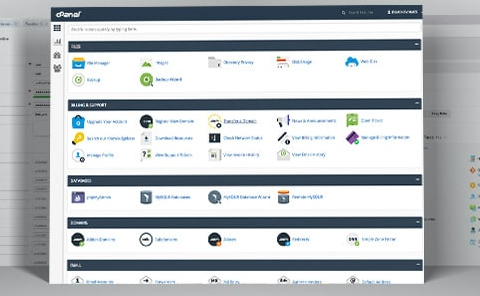
- cPanel control panel for easy management
- No ads on your hosted sites
- 400+ one-click installer applications
Best For:
Students building websites, learning web development, hosting portfolio projects, and running PHP-based applications.
Performance Characteristics:
InfinityFree delivers surprisingly robust performance for a completely free service. Sites load quickly, and the infrastructure handles moderate traffic without issues. The platform uses Cloudflare integration for enhanced speed and security.
Educational Value:
The full cPanel access provides students with industry-standard hosting panel experience. This familiarity translates directly to professional environments where cPanel remains the dominant control panel.
Limitations:
While storage and bandwidth are unlimited, there are execution time limits and some restrictions on file types for security. High-traffic applications might eventually outgrow the free tier, but for student projects, these limits are rarely encountered.
2. Render
Render has emerged as a developer-favorite platform that treats free tier users as genuine members of the community rather than temporary visitors. The platform focuses on modern application deployment with exceptional ease of use.
Key Features:
- 750 hours per month of free compute time
- Automatic HTTPS with custom domains
- Continuous deployment from Git repositories
- Support for Node.js, Python, Go, Rust, Ruby, and more
- PostgreSQL databases (90-day data retention on free tier)
- Static site hosting with global CDN
- Background workers and cron jobs
Best For:
Students deploying full-stack applications, learning DevOps practices, and building portfolio projects with modern frameworks.
Recent Developments 2026:
Render recently expanded their free tier to include increased compute time and enhanced database options, making it even more suitable for student projects that need to stay online continuously.
Standout Advantage:
The Git-based deployment workflow teaches students industry-standard CI/CD practices. Every push to your repository can trigger automatic deployments, mirroring professional development environments.
3. Railway
Railway has revolutionized how students think about cloud deployment by making the process almost absurdly simple while maintaining professional-grade capabilities.
Key Features:
- $5 free credit monthly (no credit card required)
- Deploy from GitHub with one click
- Built-in databases (PostgreSQL, MySQL, MongoDB, Redis)
- Environment variable management
- Team collaboration features
- Automatic SSL certificates
- Custom domains supported
Best For:
Rapid prototyping, hackathon projects, learning database management, and deploying containerized applications.
Student-Specific Benefits:
The monthly credit refreshes automatically, meaning students can run small projects indefinitely or larger experiments temporarily. This flexibility perfectly matches academic project cycles.
Technical Capabilities:
Railway supports Docker containers natively, providing students with valuable containerization experience. The platform handles orchestration complexity while exposing enough configuration to facilitate learning.
4. Vercel
Originally built for Next.js applications, Vercel has expanded into a comprehensive platform for frontend developers and full-stack applications, all without requiring payment information for the free tier.
Key Features:
- Unlimited websites and API routes
- 100GB bandwidth monthly
- Serverless functions with 100GB-hrs compute time
- Automatic deployments from Git
- Global CDN with edge network
- Custom domains with automatic HTTPS
- Preview deployments for every commit
- Analytics and web vitals monitoring
Best For:
Frontend development, React/Next.js applications, serverless architecture learning, and modern web applications.
Performance Excellence:
Vercel’s edge network ensures that student projects load with professional-level speed globally. This makes portfolios impressive to potential employers and provides realistic performance metrics for learning optimization.
Collaboration Features:
The preview deployment functionality is exceptional for team projects. Every pull request gets its own live preview URL, making code review and collaboration seamless.
5. Netlify
Netlify specializes in making frontend deployment effortless while providing robust backend capabilities through serverless functions, all accessible to students without payment requirements.
Key Features:
- 100GB bandwidth monthly
- Unlimited sites and team members
- Automatic HTTPS on custom domains
- Continuous deployment from Git
- Serverless functions (125,000 requests/month)
- Form handling with spam filtering
- Split testing and branch deploys
- Identity management for user authentication
Best For:
Static site generators, JAMstack applications, learning modern web architectures, and portfolio hosting.
Educational Ecosystem:
Netlify has created extensive documentation and learning resources specifically targeting students and beginners. The platform actively supports educational initiatives and open-source projects.
Unique Capabilities:
The built-in form handling and identity management allow students to build sophisticated applications without needing separate backend services for these common features.
6. Heroku (with GitHub Student Developer Pack)
While Heroku discontinued its traditional free tier, students can still access substantial free credits through the GitHub Student Developer Pack, making it effectively free for educational use.
Key Features:
- Full platform access with student credits
- Support for multiple languages and frameworks
- Add-ons for databases, caching, monitoring
- Pipeline feature for staging environments
- Easy scaling options
- Git-based deployment
- Process management and logging
Best For:
Learning enterprise deployment practices, building production-ready applications, and gaining experience with platform-as-a-service concepts.
Getting Started:
Students need to verify their academic status through GitHub Education, which also unlocks dozens of other free tools and services. This one-time verification provides ongoing access to professional development resources.
Professional Preparation:
Heroku’s architecture and deployment model are widely used in industry. Experience gained on this platform translates directly to professional environments.
Also Read: 5 Free GPU Server for Students in 2026
7. Cloudflare Pages
Cloudflare Pages leverages Cloudflare’s massive global network to provide exceptionally fast static site hosting completely free, with no payment information required.
Key Features:
- Unlimited sites and requests
- Unlimited bandwidth
- Git integration with GitHub and GitLab
- Custom domains with automatic HTTPS
- Collaborator access for teams
- Preview deployments
- Web analytics
- Access to Cloudflare Workers for dynamic functionality
Best For:
Static websites, documentation sites, blogs, and frontend applications with serverless backend needs.
Performance Leadership:
Sites hosted on Cloudflare Pages benefit from one of the world’s largest and fastest CDN networks. Student projects achieve enterprise-level performance and reliability.
Workers Integration:
The ability to add serverless functions through Cloudflare Workers expands possibilities significantly, allowing students to build full-stack applications on what appears to be a static hosting platform.
8. Glitch
Glitch combines cloud hosting with a unique community-focused approach that makes learning collaborative and fun, perfect for students just beginning their coding journey.
Key Features:
- Instant development environment in browser
- Collaborative coding in real-time
- Automatic deployment of changes
- Support for Node.js, Python, and static sites
- Built-in database (SQLite)
- Community gallery for sharing projects
- Remix feature to fork any public project
- No sleep/downtime for active projects
Best For:
Learning to code, collaborative class projects, experimenting with frameworks, and building interactive tutorials.
Community Learning:
The ability to view and remix other users’ code creates a unique learning environment. Students can see how experienced developers structure projects and learn by modification rather than starting from scratch.
Educational Philosophy:
Glitch was designed with education in mind. The platform removes barriers between idea and implementation, making it ideal for students who learn best by doing.
9. Fly.io
Fly.io offers a generous free tier focused on running applications close to users globally, providing students with edge computing experience without payment requirements.
Key Features:
- 3 shared CPU VMs with 256MB RAM each
- 3GB persistent storage
- 160GB outbound data transfer
- Global deployment locations
- Docker-based deployments
- Built-in certificate management
- PostgreSQL databases
- No credit card required for free tier
Best For:
Learning distributed systems, deploying globally, working with containers, and running lightweight applications.
Technical Sophistication:
Fly.io exposes students to concepts like edge computing and geographic distribution that are increasingly important in modern application architecture. This advanced exposure is valuable for students pursuing careers in infrastructure or backend development.
Resource Allocation:
The three free VMs can run different applications or different regions of the same application, teaching students about load balancing and redundancy.
10. PythonAnywhere
Specifically designed for Python developers, PythonAnywhere provides hosting and development environment without requiring any payment information for the free tier.
Key Features:
- Beginner account completely free forever
- Web-based Python console and editor
- Host one web application
- MySQL database access
- Scheduled tasks for automation
- File storage and management
- Support for popular Python frameworks (Django, Flask)
- Educational resources and tutorials
Best For:
Python learning, Django/Flask development, automation scripts, and data science projects.
Learning-Focused Design:
The platform includes extensive tutorials and documentation specifically aimed at students and beginners learning Python web development.
Limitations to Know:
The free tier restricts outbound internet access and CPU usage, but for most student learning projects, these limitations don’t interfere with educational goals.
Security and Performance Considerations
Security Best Practices for Students:
Cloud platforms handle much of the security infrastructure, but students must still follow essential practices:
Account Security:
- Use unique, strong passwords for each platform
- Enable two-factor authentication wherever available
- Never commit API keys or secrets to public repositories
- Regularly review access logs when platforms provide them
- Use environment variables for sensitive configuration
Application Security:
- Keep frameworks and dependencies updated
- Validate user input in applications
- Use HTTPS for all production deployments
- Implement proper authentication and authorization
- Follow security best practices specific to your chosen framework
Performance Insights 2026:
Recent benchmarking of free tier platforms reveals impressive capabilities:
| Platform | Average Uptime | Deploy Time | Global CDN | Database Included |
|---|---|---|---|---|
| InfinityFree | 99.5% | Instant | Yes | MySQL |
| Render | 99.9% | 2-3 min | Yes | PostgreSQL |
| Railway | 99.8% | 1-2 min | Yes | Multiple options |
| Vercel | 99.95% | <1 min | Yes | Partner integrations |
| Netlify | 99.95% | <1 min | Yes | Partner integrations |
| Fly.io | 99.9% | 2-4 min | Yes | PostgreSQL |
Resource Management:
Free tiers come with resource limits that, when understood properly, prove sufficient for educational purposes:
Bandwidth Considerations: Most student projects never approach bandwidth limits. A portfolio site might use 1-2GB monthly, well under typical 100GB free tier allowances.
Compute Time: Platforms offering monthly hour allocations (like Render’s 750 hours) provide more than enough for continuous hosting of lightweight applications, as 750 hours exceeds the hours in a month.
Storage: Student projects rarely require extensive storage. Most applications, databases, and assets comfortably fit within typical 1-10GB free tier storage limits.
How to Choose the Right Platform
Decision Framework for Students:
Project Type:
- Simple portfolio website? → InfinityFree or Cloudflare Pages
- Full-stack application? → Render or Railway
- React/Next.js project? → Vercel
- Python web application? → PythonAnywhere or Render
- Learning environment? → Glitch
- Distributed application? → Fly.io
Technical Experience Level:
- Beginner: Glitch, PythonAnywhere, Netlify
- Intermediate: Vercel, Render, Railway
- Advanced: Fly.io, Heroku (with student pack)
Learning Goals:
- Web development fundamentals → InfinityFree
- Modern deployment practices → Vercel, Netlify, Render
- DevOps and infrastructure → Railway, Fly.io
- Specific framework expertise → Match platform to framework strength
Combining Platforms:
Many successful student developers use multiple platforms strategically:
- Frontend on Vercel/Netlify for optimal performance
- Backend APIs on Render or Railway for database access
- Static documentation on Cloudflare Pages
- Experimental projects on Glitch for rapid iteration
This multi-platform approach maximizes free tier benefits while teaching diverse deployment strategies.
Getting Started Guide
Week 1: Foundation
Day 1-2: Account Setup
- Choose your primary platform based on current project needs
- Create account with academic email for potential student benefits
- Complete profile and verify email
- Explore platform documentation and quickstart guides
Day 3-4: First Deployment
- Deploy a simple “Hello World” application
- Configure custom domain if available
- Test deployment process
- Document steps for future reference
Day 5-7: Environment Familiarization
- Explore dashboard and available features
- Set up environment variables
- Configure deployment settings
- Join platform community forums
Month 1: Building Competence
- Deploy 3-5 increasingly complex projects
- Experiment with different frameworks
- Learn platform-specific features
- Begin documenting your deployment knowledge
- Connect with other students using the platform
Semester 1: Mastery and Expansion
- Build a substantial project showcasing platform capabilities
- Try secondary platforms for specific use cases
- Contribute to community by helping other students
- Create deployment templates for common project types
- Consider upgrading to paid tiers if projects demand it
Migration Strategy:
As projects grow or requirements change, smooth migration ensures continuity:
- Document Everything: Keep detailed notes on configuration, environment variables, and dependencies
- Use Git Religiously: Version control makes moving between platforms straightforward
- Abstract Platform-Specific Code: Design applications to minimize platform-specific dependencies
- Test Locally: Ensure projects run locally before deploying to new platforms
- Gradual Transition: Move one component at a time rather than entire applications
Best Practices for Students
Academic Integrity:
Cloud platforms enable collaboration, but students must maintain academic integrity:
- Don’t share assignment code in public repositories
- Use private repositories for class projects when required
- Credit all external code and libraries properly
- Understand your institution’s policies on code sharing and collaboration
Portfolio Development:
Free cloud hosting is perfect for building professional portfolios:
- Deploy projects that showcase diverse skills
- Maintain clean, documented code
- Write comprehensive README files
- Include live demos and documentation
- Update projects to fix bugs and add features
Cost Awareness:
While these platforms are free, developing cost-conscious habits prepares students for professional environments:
- Monitor resource usage regularly
- Optimize applications for efficiency
- Understand what triggers usage limits
- Learn to estimate infrastructure costs
- Practice resource cleanup for unused projects
Community Engagement:
Most platforms have vibrant communities where students can:
- Ask questions and get help
- Share knowledge and help others
- Discover new techniques and best practices
- Find collaboration opportunities
- Build professional networks
Conclusion
The availability of quality cloud hosting without credit card requirements has fundamentally changed what’s possible for student developers in 2026. No longer do financial barriers or payment concerns prevent students from gaining hands-on experience with the same tools and platforms used by professional developers worldwide.
InfinityFree provides traditional web hosting with remarkable generosity. Render and Railway offer modern, Git-integrated deployment that teaches industry-standard practices. Vercel and Netlify revolutionize frontend deployment with global edge networks. Glitch makes learning collaborative and accessible. Fly.io introduces edge computing concepts. PythonAnywhere specializes in the Python ecosystem with educational focus.
The key to maximizing these resources lies in matching platform strengths to project requirements while maintaining awareness of limitations. Start with one platform that aligns with your immediate needs, master its capabilities, and expand your toolkit as your skills and projects evolve. Remember that these free tiers aren’t just cost-saving measures—they’re genuine learning platforms designed to support educational growth.
For students serious about development careers, experience gained deploying real applications to these platforms proves invaluable during job searches. Employers value candidates who can demonstrate not just coding ability but also understanding of deployment, hosting, and infrastructure—exactly the skills developed through hands-on work with these platforms.
The democratization of cloud infrastructure through these free, no-credit-card-required platforms means that student success depends entirely on curiosity, dedication, and willingness to experiment—not on financial resources or access to expensive hardware. Take advantage of these opportunities, build impressive projects, learn from failures, and develop the practical skills that transform students into professional developers. The cloud is genuinely accessible to everyone, and your next great project is just a deployment away.